AI training platforms can look simple from the outside: apply, pass an assessment, complete remote tasks, get paid. The payment process is usually more structured than that. Most platforms do not pay you just because your account is approved. They pay after eligible work is completed, reviewed, accepted, and moved through a payout system.
That difference matters. A beginner may think, "I got accepted, so where is my pay?" A more experienced AI trainer knows to ask different questions: Was the work payable? Was it submitted before the cutoff? Was it approved? Did it move to the earnings dashboard? Has the payout processor received it? Is the bank still processing it?
This guide explains how AI training platforms actually pay remote workers, when payments usually arrive, why first payouts can take longer, and how to avoid the most common delays. It applies broadly to AI model evaluation, data annotation, prompt writing, AI response rating, research tasks, expert review work, coding evaluation, multilingual review, and other work from home AI jobs.
The Basic Payout Chain
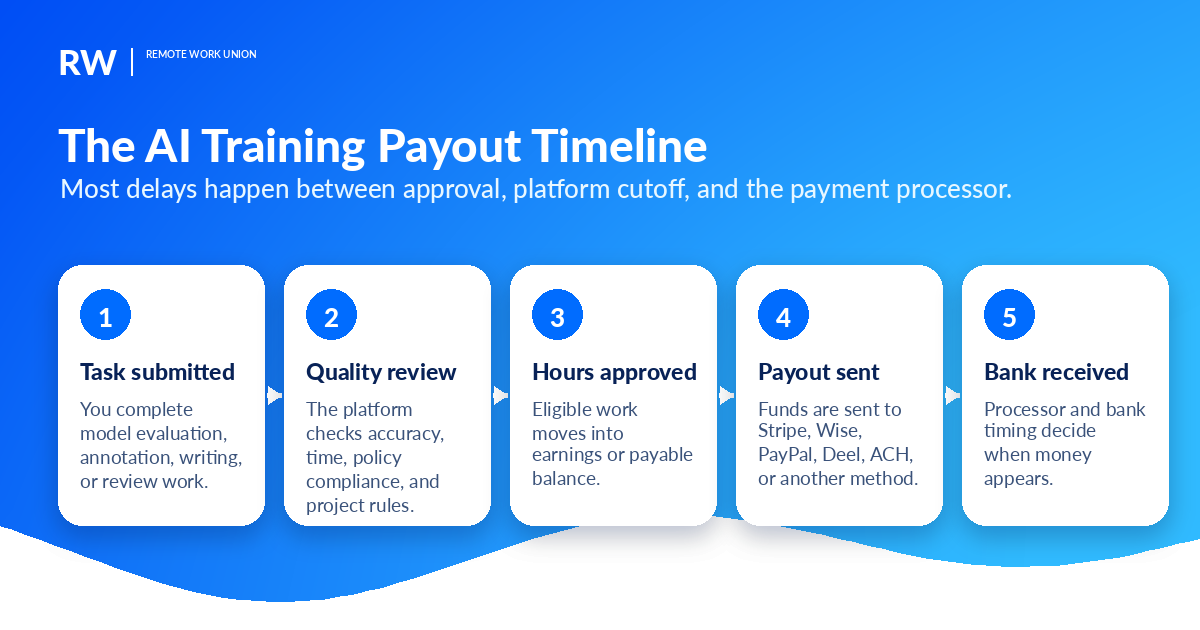
Most remote AI work follows a payment chain with several steps. The exact platform can change the details, but the basic flow is similar:
- You apply and get accepted or matched to a project.
- You complete onboarding, identity verification, tax forms, and payout setup.
- You work on eligible tasks or log approved hours.
- The platform reviews the work for quality, accuracy, time, location, and policy compliance.
- Approved earnings appear in a dashboard, invoice, or payable balance.
- The platform sends money to a payment processor such as Stripe, Wise, PayPal, Deel, ACH bank transfer, Airtm, or another supported method.
- The processor and bank deliver the money to you.
The important point is that the platform and the payment processor are not the same thing. A platform may mark a payout as sent, processed, paid, transferable, or approved before the money is visible in your bank. That does not always mean something is wrong. It often means the payment has left the platform and is now moving through Stripe, Wise, PayPal, Deel, ACH, Airtm, or your local banking system.
Getting Accepted Is Not the Same as Getting Paid
This is the first confusion point for new applicants. On platforms like micro1, Mercor, Handshake AI, Outlier, DataAnnotation, and similar AI training companies, your account status and your payment status are separate.
You may be accepted to a platform but not yet matched to a paid project. You may be matched to a project but still need to pass a qualification. You may pass a qualification but have no active tasks available. You may complete onboarding, but the onboarding may not be payable unless the project terms say it is. You may complete work, but it may still need review before it becomes eligible for payment.
Useful rule: Do not count money as earned until it appears in the platform's earnings, payment, invoice, or approved-balance area. If a task is still pending review, or the project says the activity is unpaid onboarding, it is not the same as cleared cash.
When AI Training Platforms Usually Pay
Many AI training and data annotation platforms use weekly payment cycles. Some send payments on a specific weekday. Others let you withdraw after funds become transferable. Some pay after invoices are approved. Some international platforms route money through contractor systems where the timing depends on your country and payout method.
Here is the practical pattern most workers should expect: work completed during a project week is reviewed or finalized after the week closes, the platform runs a payout batch on a scheduled day, the payment processor receives the payout, and the money arrives after processor and bank timing.
For example, some platforms publicly describe weekly processing. Mercor's documentation describes weekly payouts through Stripe or Wise, with timing depending on hours submitted, processing, and account setup. Outlier's FAQ says payments are processed weekly on Tuesdays and lists PayPal, Airtm, and ACH bank transfer as payout options. Handshake AI's help center says payments are typically sent to partner pay platforms by Wednesday afternoon for the previous week's work period. DataAnnotation's FAQ says it sends payments through PayPal after you request them, with deposits generally delivered within a few days.
Those examples should not be treated as permanent guarantees for every worker. Payment schedules can change by project, country, platform, processor, and account status. Always check the current project terms and your platform dashboard before relying on a specific date.
Why Your First Payout Often Takes Longer
The first payout is usually the slowest because the platform is not just paying you. It is also verifying that you are eligible to be paid.
Common first-payout requirements include identity verification, tax form completion, payout method setup, bank account confirmation, profile approval, location validation, contract acceptance, and project onboarding. If the platform uses Stripe, Wise, Deel, PayPal, Airtm, or another third-party processor, that processor may also review your account before releasing funds.
A first payment can be delayed even when your work is fine. The delay may come from a missing W-9 or W-8, a bank account that does not match your country, a PayPal email typed incorrectly, a Stripe account that needs more information, a Deel profile that is not fully set up, or a payout method unavailable in your region.
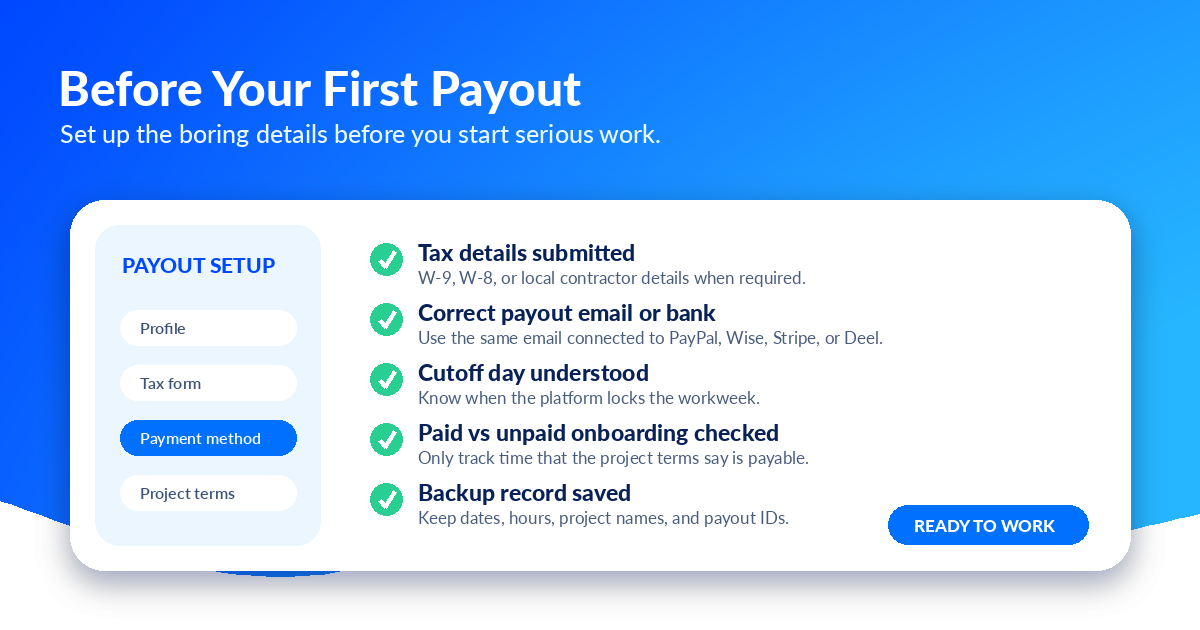
Before doing serious hours on any remote AI job, open the payment settings and confirm four things: your legal name, tax details, payout method, and country are all correct. If one of those is wrong, the work may still appear in the platform, but the payout may stall.
Paid Work vs Unpaid Setup Work
Not every activity inside an AI training platform is paid. This is another common beginner mistake.
Paid work usually includes approved production tasks, approved project work, accepted deliverables, or verified hours under an active contract. Paid onboarding is also paid if the project terms explicitly say so.
Unpaid setup work may include creating your account, filling out your profile, adding your resume, completing payment setup, reading general platform rules, connecting a payment processor, taking some qualification tests, or completing onboarding steps that are not marked as payable.
Some platforms do pay for certain trials, onboarding modules, or assessments. Others do not. The safest approach is to read the project terms before starting. If a project says onboarding is paid, keep records. If a project does not say onboarding is paid, assume it is unpaid until confirmed.
How the Main Payout Methods Work
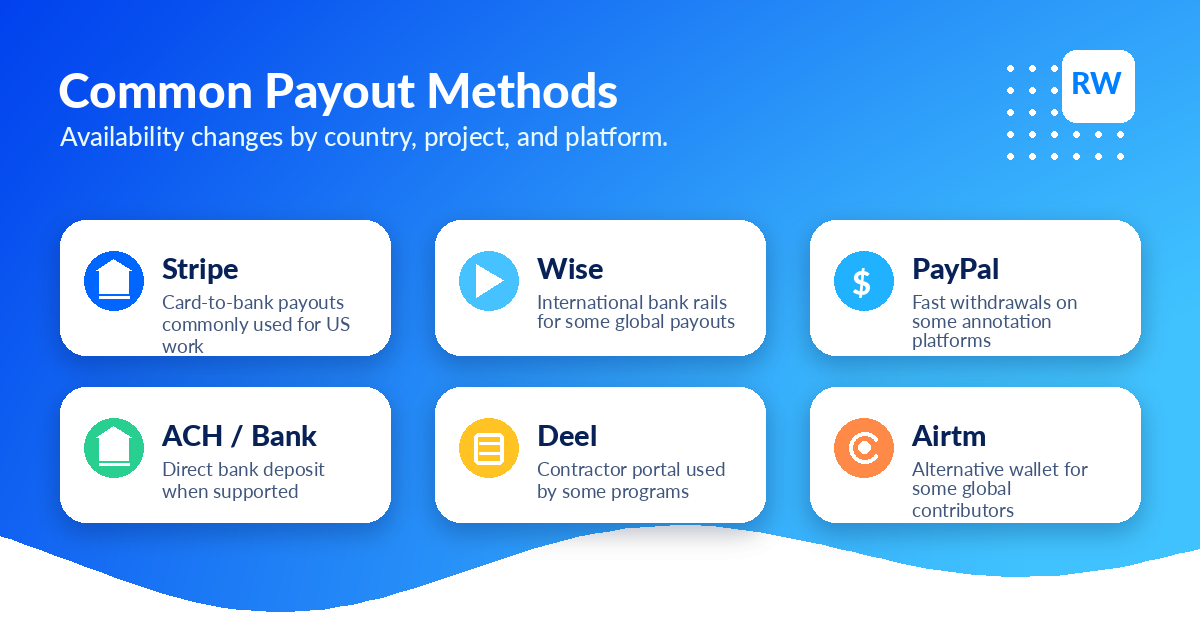
Stripe is common for contractor and marketplace payouts. A platform may use Stripe Express or a similar flow to collect bank information and send payouts. Stripe can be fast once everything is set up, but holds, identity checks, mismatched account details, or unavailable local banking support can delay payment.
Wise is often used for international payouts or regions where another processor is unavailable. It can support local currency transfers in many countries, but the exact delivery time depends on the country, currency, verification status, and local banking rails.
PayPal is common on some annotation platforms because it is familiar and can be fast after funds are released. The risk is that the email address must be correct and eligible to receive the currency being sent.
Deel is a contractor payment and compliance platform. It can be useful when a company wants contractors to sign agreements, submit tax details, and withdraw through multiple methods. The timeline may depend on the client funding the invoice, Deel processing status, and your selected withdrawal method.
ACH or direct bank deposit can be reliable but is often slower than wallet-style payouts. Weekends, holidays, and bank review can add extra days.
Airtm and other wallets are used on some global AI platforms for countries where PayPal, ACH, or Stripe are less practical. Understand withdrawal fees, conversion rates, and local availability before relying on them.
Why Payments Get Delayed
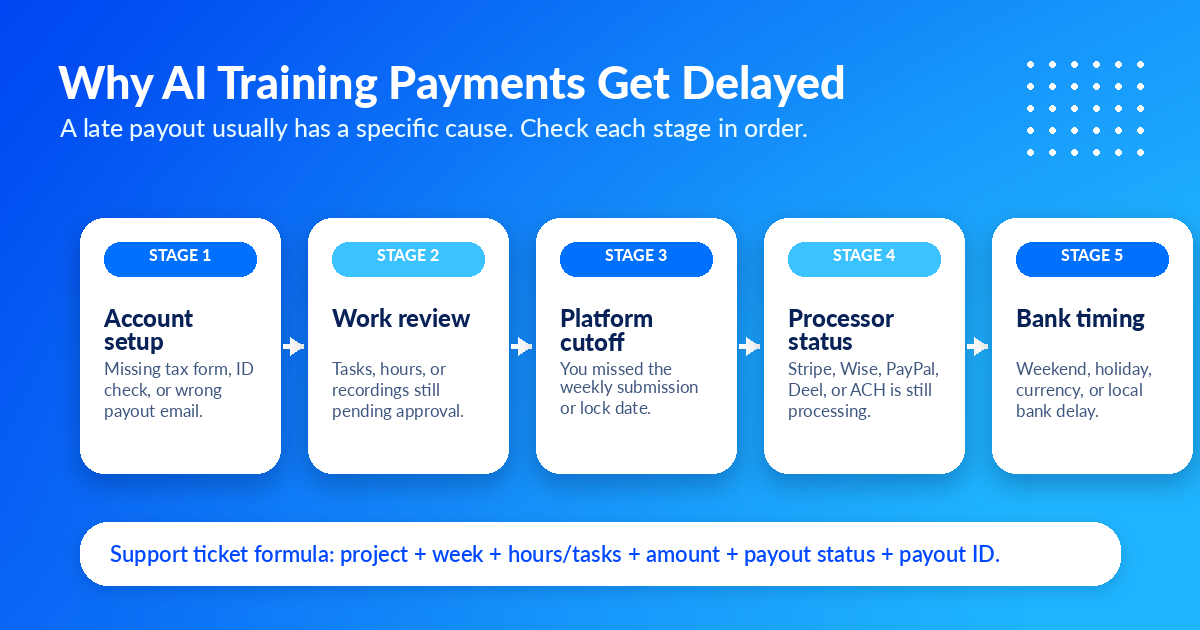
Late payouts usually come from one of seven places. First, your account setup may be incomplete — missing tax details, identity verification, payout method configuration, or contract acceptance can block the payout even if the work is approved. Second, the work may still be under review. Third, you may have missed the weekly cutoff. Fourth, the payment processor may be processing the transfer. Fifth, your bank may be slow. Sixth, your account may be flagged due to VPN use, working from an unsupported country, sharing an account, logging suspicious hours, or submitting inconsistent work. Seventh, project rules may limit what gets paid — some projects do not pay for setup time, rejected tasks, duplicate submissions, over-cap hours, or work done before official approval.
How to Track Your AI Training Earnings
Do not rely only on memory. AI training income can come from multiple platforms, projects, pay rates, and processors. Track it like contractor income with a simple spreadsheet: platform, project name, date worked, hours or tasks completed, listed rate, expected amount, submission date, approval status, payout batch date, processor used, amount received, and notes or support ticket number.
This protects you in three ways. It helps you notice missing payments, it gives support teams the details they need, and it makes taxes easier. For US-based independent contractors, gig income is generally taxable, and some workers may need to make estimated tax payments. Workers outside the US should check local tax rules and platform tax forms.
What to Do If Your Payout Is Late
Start by checking the dashboard. Is the work pending, approved, processing, sent, paid, failed, on hold, or missing? Then check your payout method. Confirm your bank details, PayPal email, Stripe setup, Wise email, Deel profile, tax form, and identity verification. Next, compare the date to the platform's normal processing window.
If it is still late, contact support with a structured message:
Useful format: Subject: Missing payout for [project name], week of [date]. Body: Include your full name, account email, platform, project, dates worked, number of hours or tasks, expected amount, payout method, current payment status, and any payout ID, invoice ID, or transaction ID visible in the dashboard.
How to Reduce Payment Risk
Do not depend on one platform. Work availability can change. Accounts can be paused. Projects can end. Applying to multiple platforms — such as micro1, Mercor, Handshake AI, and Outlier — reduces income risk.
Do not ignore project rules. If a project has an hour cap, location restriction, no-AI-assistance policy, confidentiality rule, or required work process, follow it closely. Payment disputes often start when the platform believes the worker violated a rule.
Do not wait until payday to check setup. Connect your payout method early. Confirm tax details early. Save your processor login early. Do not spend money before it clears. A dashboard balance is not the same as cash in your bank.
Best Practices Before Accepting a New AI Training Project
Before starting a project, answer these questions: What is the hourly rate or task rate? Is the work paid by hour, task, approved deliverable, or milestone? Are trials or onboarding tasks paid? What is the workweek cutoff? When are payments processed? Which payout methods are supported in my country? Are there fees or currency conversion issues? Is there an hour cap? What happens if work is rejected? Who do I contact for payment support?
If you cannot answer those questions, slow down before committing major time.
Ready to find legitimate AI training roles with clear payment terms? Remote Work Union helps you apply to trusted platforms.
Find Roles Hiring Now →Frequently Asked Questions
Do AI training platforms pay instantly?
Usually no. Some platforms allow fast withdrawals after funds are approved, but most work still needs to pass review, cutoff, and payout processing first. A more realistic expectation is that you finish eligible work, wait for review or approval, pass the platform's weekly or project cutoff, wait for the payout batch, and then wait for the processor or bank.
Why does my dashboard say paid but my bank has no money?
The platform may have sent the payout to the processor, but the processor or bank may still be moving the money. Check the payout status, transaction ID, trace ID, processor dashboard, and bank timing. If it persists past the normal processing window, contact support with a structured message including your payout ID and transaction details.
Are AI training workers employees or contractors?
Many AI training roles are contractor or freelance roles, not traditional employee jobs. That means no automatic benefits, no guaranteed hours, and no standard paycheck withholding unless a specific platform or contract says otherwise. For US-based independent contractors, gig income is generally taxable and may require estimated tax payments.
Which payout method should I use — PayPal, Stripe, Wise, Deel, ACH, or Airtm?
Use the method the platform supports in your country with the least friction. Confirm the email, bank country, currency, fees, and withdrawal options before relying on it. Stripe is common for domestic payouts. Wise is often used for international transfers. PayPal is familiar but requires the correct email. Deel is common when contractors sign formal agreements.
What should I do if my AI training payout is late?
First check the dashboard — is the work pending, approved, processing, sent, paid, or on hold? Then confirm your payout method setup is complete. Compare the date to the platform's stated processing window. If still late, contact support with your full name, account email, platform, project, dates worked, expected amount, payout method, current status, and any payout or invoice ID visible in the dashboard.
How many AI training platforms should I join?
For steady remote income, one platform is rarely enough. Work volume can change by platform, location, and project availability. Serious workers usually apply to several AI training, data annotation, model evaluation, and remote work platforms so one paused account or slow period does not stop all income.