Slowdowns are a normal feature of project-based AI training work. Task availability can drop with zero warning and rebound just as suddenly. A platform may be busy one week and quiet for the next three. A project you were assigned to may end without announcement. Capacity on a platform you recently joined may fill before your assessment clears.
None of this is unusual. But it is disorienting the first time it happens, especially if you have been relying on a single platform as your primary source of remote income. This guide explains what slowdowns actually mean, how to diagnose whether yours is a normal demand drop or an account issue, and what practical steps to take — in the first three days, the first two weeks, and over the long term — to protect your AI training income pipeline.
Slowdowns Are Normal in Project-Based AI Work
AI training work is not a salaried job. It is project-based contractor work. AI companies assign batches of tasks to platforms, platforms route those tasks to qualified contractors, and when a batch ends, there may be a gap before the next one begins. The gap is not a reflection of your quality as a worker — it is a reflection of how project-based work operates.
Platforms like Outlier AI, Mercor, Handshake AI, and micro1 all experience demand cycles. Some of those cycles are predictable — new AI model releases often bring a surge in evaluation work. Others are unpredictable — a client pauses a project, a platform over-hired for a specific task type, or a project wraps up ahead of schedule. Experienced remote AI workers treat this as background noise, not an emergency.
The workers who struggle most during slowdowns are the ones who had all of their eggs in one basket. The workers who handle them best are the ones who recognized the structure of the work early and built pipelines that do not depend on any single platform being busy at any given time.
How to Diagnose the Slowdown
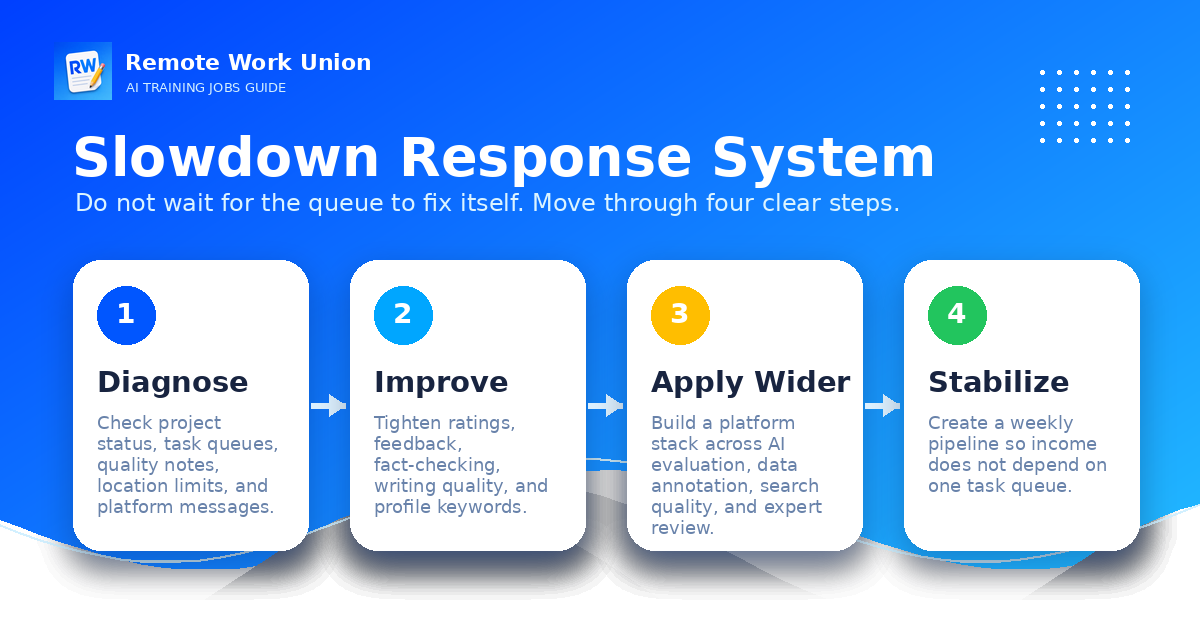
Before responding to a slowdown, it is worth spending a few minutes understanding what kind of slowdown you are actually facing. There are four main categories, and each one calls for a slightly different response.
1. Platform-wide demand pause. This is the most common type. The platform simply has less work available than usual. No tasks are showing up for anyone in your task category. This is not an account issue — it is a supply-and-demand issue. The right response is patience plus parallel applications on other platforms.
2. Project end. The specific project you were assigned to has completed. This is normal. Projects have finite scopes. The platform may not announce project ends clearly. Your task feed just goes quiet. Check your dashboard for any new project assignments or onboarding invitations, and apply to new project types on the same platform.
3. Account standing issue. If your recent task scores were flagged, if you submitted assessments below the platform's quality threshold, or if there was a terms-of-service issue, your account may be in a restricted state. This is different from a demand pause — it requires direct action. Check your email and account dashboard for any notifications about quality or compliance.
4. Qualification gap. You are qualified for one task type on a platform, but that type has no current work. The platform has other task types, but you have not been cleared for them yet. This is resolved by applying to additional task types on the same platform, completing any required qualification assessments, and expanding your certified scope.
What to Check First
When work goes quiet, run through this checklist before drawing any conclusions or contacting support:
- Dashboard status: Log in and check for any platform-wide announcements, project status updates, or maintenance notices. Most platforms communicate demand pauses or project ends through in-app notifications or email.
- Email inbox: Check for platform emails including quality feedback, new project invitations, or account notices. Filter for the platform's sending domain — these emails sometimes end up in spam or promotions folders.
- Account standing: Look for any flags, warnings, or quality notes on your profile. If a recent task was scored below threshold, it will usually appear here.
- Recent task scores: If the platform provides score data, review your last five to ten submissions. A pattern of declining scores is a signal worth addressing before the platform flags it.
- Available task types: Check whether tasks are available in other categories, not just your current one. Sometimes one task type is paused while others are active.
This five-point check takes about ten minutes and usually tells you which category of slowdown you are in. Most of the time, you will find either a platform-wide pause or a project end — not an account problem.
The 3-Day Response
The first three days of a slowdown are about confirmation, not panic. Here is the practical sequence.
Day 1 — Confirm the problem. Run the checklist above. If it is a demand pause or project end, note it in your application tracker and set a follow-up reminder for one week from now. Do not email support yet. Do not assume the worst.
Day 2 — Check your other platforms. If you already have accounts on Mercor, Outlier AI, Handshake AI, micro1, or other platforms, log into each one and check task availability. The same skill set that is slow on one platform may have active work on another. A multi-platform pipeline is worth its entire setup cost in the first slowdown you navigate.
Day 3 — Avoid the spiral. Slowdowns that last only a few days are common and not worth structural changes to your pipeline. Avoid the impulse to simultaneously contact support, start five new applications, and overhaul your profile. Give the platform three to five business days before drawing conclusions. Focus on the platforms where work is currently available.
Key principle: The 3-day response is not inaction — it is deliberate restraint. Panicking into hasty decisions during a slowdown is a reliable way to create more problems than the slowdown itself.
The 2-Week Response
If the slowdown persists past a week, shift into a more active response mode. Two weeks of quiet typically indicates either a genuine demand trough or a structural issue with your pipeline that predates the slowdown.
Apply to new platforms. If you were relying on one or two platforms, this is the signal to add two more. Follow the guidance in the platform selection section of the multi-platform strategy articles — start with the platforms that best match your skill lane and apply in sequence, not all at once.
Improve your profile. A slowdown is the best time to do profile maintenance work you have been deferring. Update your availability, sharpen your skill framing, add any new domain experience, and review whether your profile accurately reflects what you can evaluate. Weak profiles that worked well enough when a platform had high demand become bottlenecks when competition for limited tasks increases.
Practice evaluator skills. Use the slow period to sharpen your core evaluation skills. Write short comparison exercises. Practice explaining which AI response is better and why. Review rubric-following technique. Arrive back at the platform when work returns with better skills than when you left.
Expand task type qualifications. Many platforms offer multiple task categories. Use the two-week window to qualify for additional task types — coding evaluation, math review, research annotation, or other domains where you have transferable competence. Broader qualification means more task availability when demand returns.
Remote Work Union connects you to legitimate remote AI training and evaluation roles across multiple platforms. Apply for free.
Find Roles Hiring Now →Maintaining Quality During Slow Periods
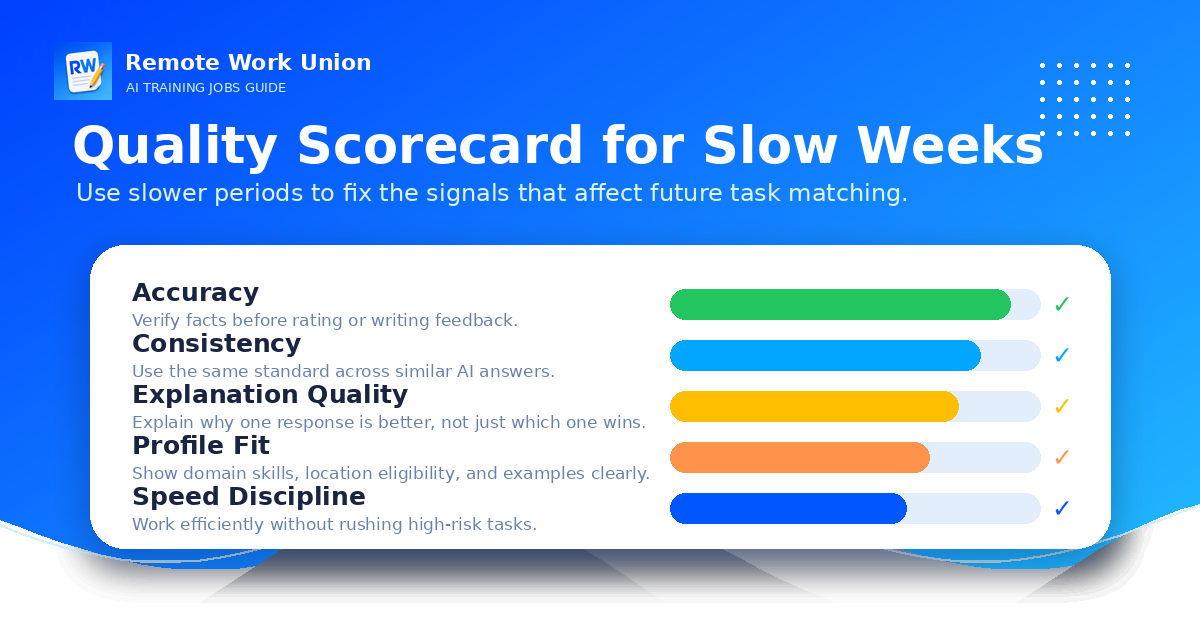
One of the less-discussed risks of slowdowns is that they cause quality degradation when work returns. If you have not evaluated anything for two weeks and tasks suddenly reappear, you may find yourself rushing, making judgment errors, or missing rubric requirements that felt obvious when you were in the flow of daily work.
The best remote AI workers treat slow periods as practice time, not vacation time. A few practical ways to stay sharp:
- Self-assigned comparison exercises: Take any two AI responses to the same prompt and write a short evaluation explaining which is better and why. Focus on observable differences — instruction-following, factual accuracy, tone, helpfulness.
- Rubric review: Re-read the rubrics and guidelines for your active platforms. Rubrics sometimes update during periods of low activity. Arriving at a task with outdated rubric knowledge is a common cause of unexpected quality flags.
- Rate calibration: Practice rating a response on a 1–5 scale and writing a rationale that defends the rating. Then challenge yourself to argue for the adjacent rating. This exercise builds the kind of calibrated judgment that makes AI evaluation work consistent.
- Domain refresher: If you do finance evaluation, skim recent financial news. If you do legal review, review any recent regulatory changes relevant to your domain. Platform tasks often reflect current topics, and domain currency makes your evaluations more accurate.
Platform Stack Strategy
A slowdown that hurts is usually a pipeline problem more than a platform problem. The single most effective way to protect against AI training income disruption is to build a platform stack — a set of two to four platforms where you maintain active, qualified accounts.
A well-structured platform stack for a generalist evaluator might look like this: Outlier AI as the primary volume platform, Mercor for expert-matched higher-rate projects, Handshake AI for fellowship-style work, and micro1 as a high-tier option if your domain expertise qualifies. When any one of these platforms slows down, the others absorb some of the gap.
For a specialist — say, a finance professional or a legal expert — the stack might weight differently: Mercor first because expert rates are higher, micro1 as a parallel high-rate option, Outlier AI as a backup for volume, and LinkedIn direct applications as a supplemental channel for higher-value individual contracts.
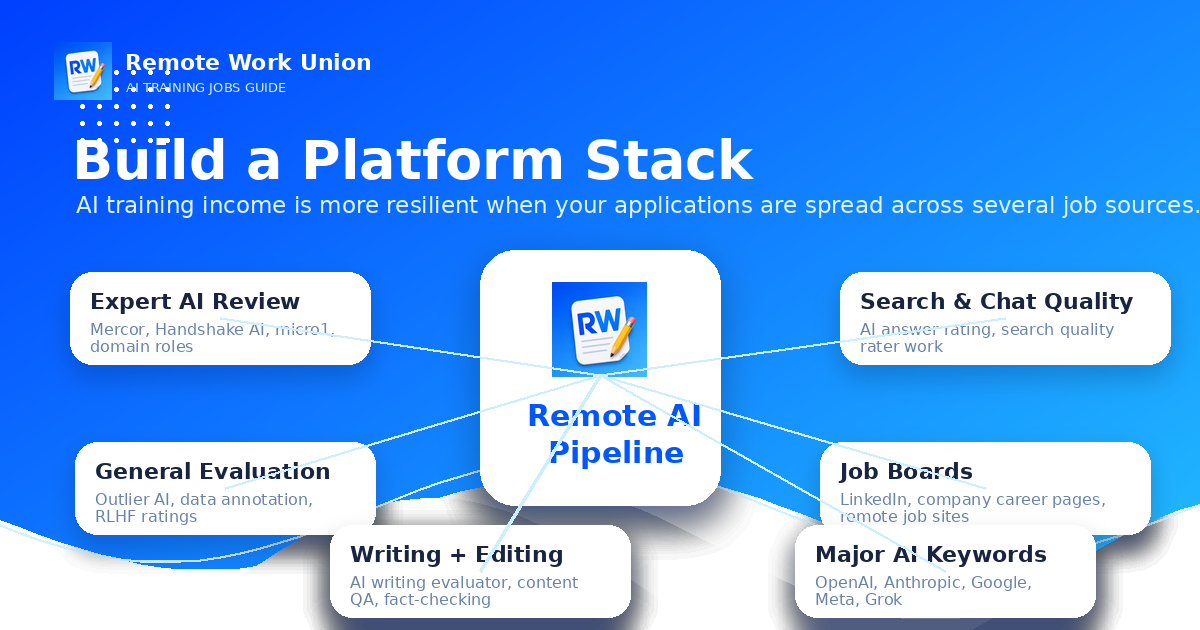
The key is not which specific platforms are in the stack — it is that there are at least three, they are maintained actively, and no single one carries more than about 60% of your task volume at any time. A stack that is weighted 90/10 is not really a stack. It is still single-platform dependence with a backup you never use.
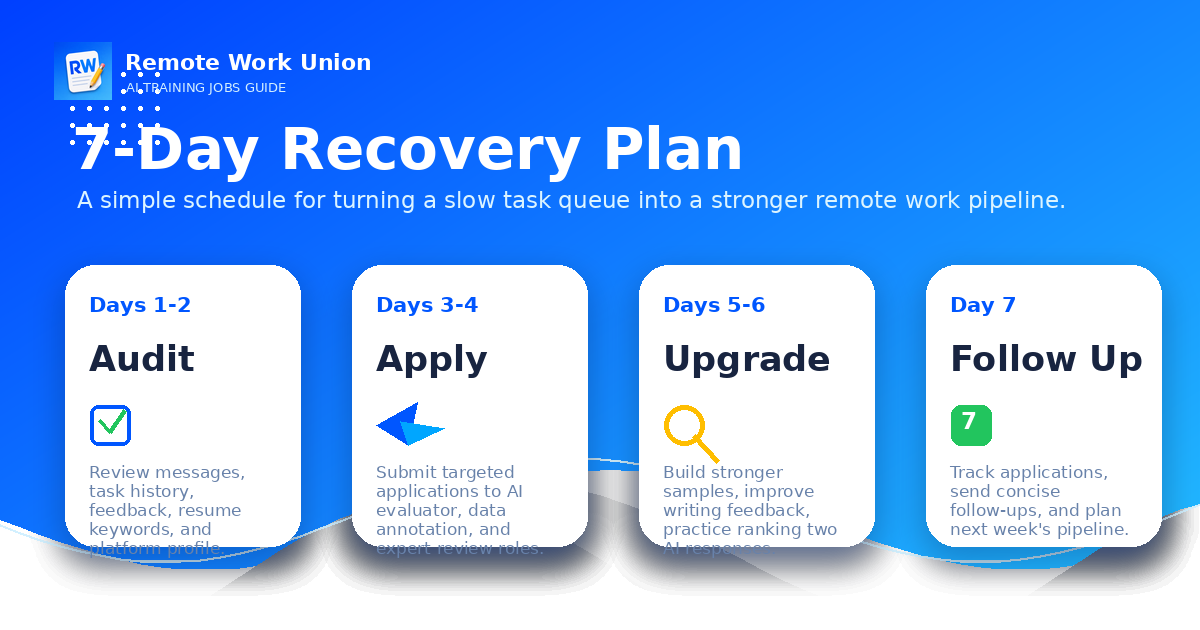
The Weekly Recovery Plan
When you are in the middle of a slowdown and actively rebuilding task volume, a weekly structure helps prevent the kind of scattered activity that produces no results. Here is a practical weekly approach for someone in week one or two of a slowdown:
Monday: Review all active platform dashboards. Check for new tasks, new project invitations, and quality feedback. Update your tracker with anything that changed over the weekend.
Tuesday: Work on platform applications or qualification assessments for any new platforms you identified. Treat assessment submissions as priority work — complete them with the same care you would give paid tasks.
Wednesday: Profile maintenance day. Update one platform profile per week during slowdowns. Check availability settings, skill tags, domain descriptions, and any platform-specific fields that affect matching.
Thursday: Practice evaluator skills. Spend 30–45 minutes on self-assigned evaluation exercises. Review rubrics for your most active platforms.
Friday: Follow up on any pending applications or assessments that are past their expected response window. Check LinkedIn and direct company career pages for any new AI evaluator or AI trainer openings.
When to Accept a Slowdown Is Permanent vs. Temporary
Most AI training slowdowns are temporary. The underlying demand for AI evaluation work is growing — more AI models are being built, more outputs need review, and more domain expertise is required. But some slowdowns are permanent for a specific reason: you have been removed from a platform, a project type you specialized in has been automated or discontinued, or a platform has exited the market entirely.
Signs that a slowdown may be permanent on a specific platform:
- No task activity for more than four to six weeks, even in categories you were previously active in.
- An account notification or email indicating suspension, quality-based removal, or terms of service action.
- Platform-wide signals such as announcements, public news, or community forum posts indicating the platform is scaling back.
- Multiple emails bouncing or support tickets going unanswered over weeks.
Signs that a slowdown is likely temporary:
- The platform is still sending marketing emails and seems operationally active.
- Community forums or public platforms show other workers in the same task type also experiencing quiet periods.
- Your account dashboard shows no warnings or quality flags.
- You have seen this platform go quiet and return before.
When a slowdown appears permanent on a platform, remove it from your active tracker and add it to a monitoring list. Check it quarterly. Do not invest time in maintaining a profile on a platform that is genuinely not sending work. Redirect that energy to platforms where you are building active standing.
Final Takeaway
AI training work slows down. That is not a bug in the system — it is a feature of project-based contractor work. The workers who navigate slowdowns best are the ones who built their pipelines before the slowdown hit: multiple platforms, active qualifications on each one, and a weekly maintenance habit that does not stop just because one platform goes quiet.
When work slows down, diagnose first, respond calmly, and use the time to improve. Improve your profile, practice your evaluation skills, apply to new platforms, and qualify for new task types on existing ones. The slowdown will end. Whether you return stronger depends on what you do while it lasts.
Frequently Asked Questions
What should I do when AI training work slows down?
Check your dashboard and email for updates, confirm your account is in good standing, then apply to other AI training platforms while you wait. Use the slow period to sharpen your evaluation skills and expand your qualifications on existing platforms.
Why does AI training work slow down?
Project-based AI work is tied to client demand. Projects end, capacity fills, and new ones open on irregular schedules. Slowdowns are normal and not always a sign of a problem with your account. Most slowdowns resolve within days to weeks as new projects open.
How long do AI training slowdowns typically last?
There is no fixed duration. Some slowdowns last days; others last weeks. The best response is to treat the slowdown as an opportunity to improve your profile and expand your platform pipeline. Do not wait passively — stay active on other platforms and keep your skills sharp.
Should I contact support when AI training work slows down?
Only if there is a technical issue or account problem. For normal demand slowdowns, support cannot create work that does not exist. Focus on applying to additional platforms and improving your qualifications. If you suspect an account standing issue, contact support with specific information about the problem.