Remote AI work can feel steady for a few weeks and then suddenly go quiet. One day you have a full queue of rating tasks, writing reviews, research prompts, annotation work, or model evaluation projects. The next day the dashboard says there are no tasks available. For many workers, that moment feels like a ban, a rejection, or the end of the opportunity.
Most of the time, it is not that simple.
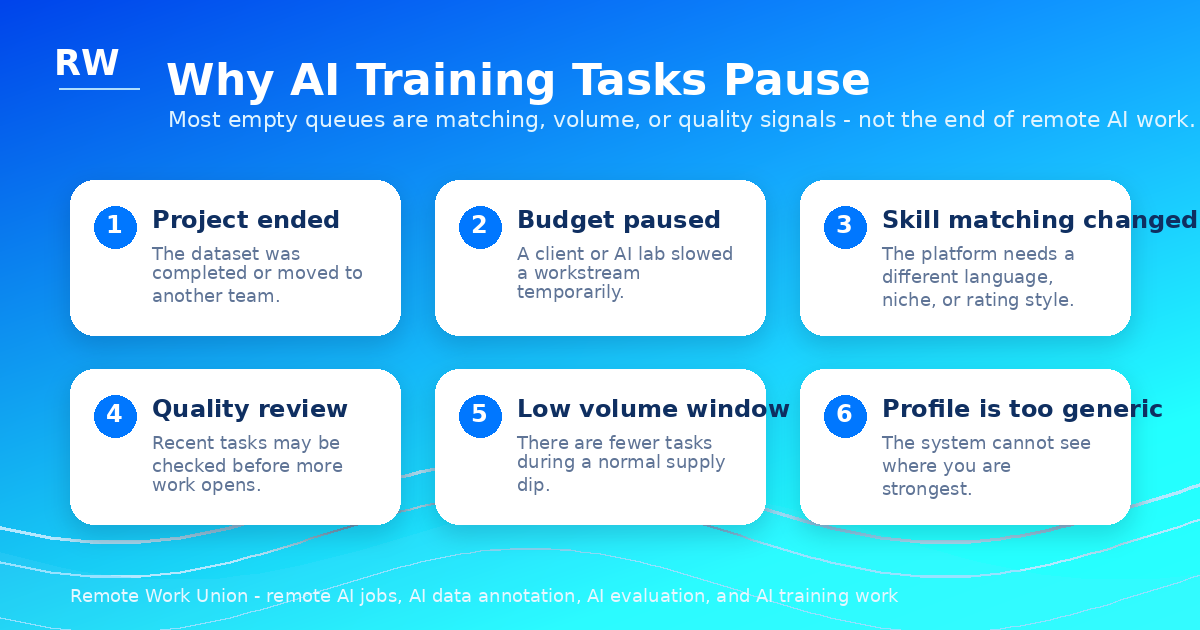
AI training platforms are marketplaces. They match workers to projects based on client demand, skill category, language, location, quality signals, availability, project budgets, and the exact kind of data an AI company needs at that moment. Work can disappear because a project finished, a client paused spending, a new qualification is required, your profile is too broad, your recent tasks are being reviewed, or the platform simply has more workers than tasks for your category that week.
That does not mean you should just wait forever. When your AI training tasks stop, you need a restart process.
What This Article Covers
- Why AI Training Tasks Stop Suddenly
- How to Tell the Difference Between a Normal Pause and a Serious Problem
- Step 1: Audit Your Account Before Changing Anything
- Step 2: Refresh Your Profile for Matching
- Step 3: Complete Every Open Qualification Carefully
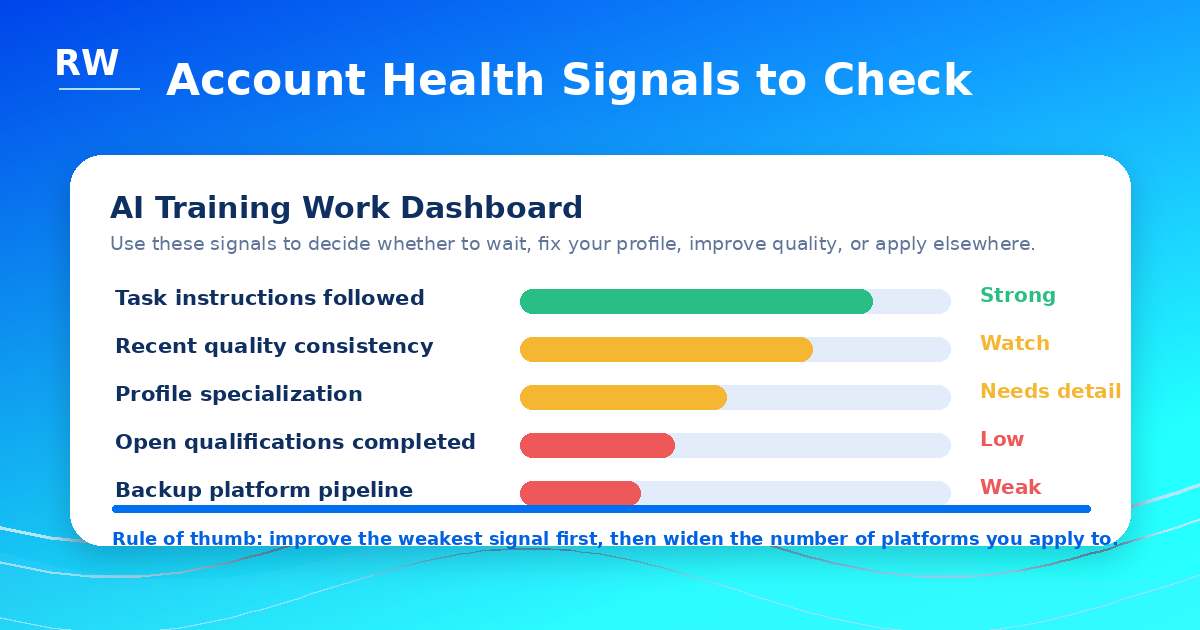
- Step 4: Improve Your Quality Signals
- Step 5: Broaden Your Task Categories
- Step 6: Stop Depending on One Platform
- Step 7: Use a Weekly Restart Routine
- What Not to Do When Tasks Stop
- A Seven-Day Restart Plan
- Frequently Asked Questions
Why AI Training Tasks Stop Suddenly
AI training work is different from a normal hourly job. In a normal job, your employer usually tells you when your schedule changes. In remote AI work, the task queue itself is often the signal.
1. The project ended
Many AI data annotation and AI evaluation projects are built around a specific dataset. The client needs a certain number of examples rated, rewritten, labeled, researched, or checked. Once the target is hit, that batch closes. This is especially common in remote AI jobs connected to model testing, content quality review, prompt evaluation, search relevance, factuality review, writing feedback, and human preference ranking.
2. The client paused or changed the budget
AI companies and contractors move fast. A lab, vendor, or client may pause a workstream, change the instructions, reduce the budget, or move the work to another group. Workers often experience that as an empty queue even when their account is fine.
3. The platform changed the matching criteria
Task assignment is often based on matching. If the platform needs legal reviewers, finance experts, native English writers, bilingual evaluators, STEM tutors, code reviewers, customer service evaluators, or people with a specific regional background, the system may prioritize those profiles first.
When tasks stop, one of the first things to check is whether your profile makes your strongest skill obvious. A generic profile that says you can do everything is often matched with nothing because it does not give the platform enough signal to place you confidently.
4. Your recent work is under quality review
Some pauses happen after a platform reviews recent submissions. This does not always mean you did something wrong. Platforms may review workers periodically, review new task types more closely, or check work after instructions change. However, if your tasks stopped right after you rushed through a project, misunderstood a rubric, failed an assessment, or submitted inconsistent ratings, quality review becomes a more serious possibility.
5. There are too many workers in your category
If a platform has too many available workers for one task category, the queue may dry up for some people while others still see work. Writing, general rating, basic data annotation, and entry-level AI evaluator tasks can fill quickly. Specialized categories tend to be more resilient because fewer workers qualify.
6. You missed a qualification or platform message
Many workers lose access to new projects because they miss a qualification, ignore an email, skip a dashboard notice, or fail to update availability. The next batch of work may be locked behind a short test, policy acknowledgment, onboarding step, or skill confirmation. If you have not logged in recently, check every tab of your dashboard before concluding that the platform has no work.
How to Tell the Difference Between a Normal Pause and a Serious Problem
A normal pause usually looks like this: your account still opens, your payment history is visible, there is no warning message, previous work is still listed, and the dashboard simply says there are no tasks available.
A more serious issue may show a compliance notice, failed quality review, disabled account, missing payment access, removed project permissions, or a message telling you that you are no longer eligible for certain work.
Support contact rule: Do not panic-submit ten support tickets. One clear message is better than repeated complaints. A useful support message is short and specific: "I noticed my task queue is empty and wanted to check whether there are qualifications, profile updates, or quality issues I should address. I am still available for AI evaluation, writing review, research, and data annotation projects."
In most cases, a quiet queue with no error message is a supply issue, not a punishment. The platform still has you in the system. The work just is not available at that exact moment for your exact profile.
Step 1: Audit Your Account Before Changing Anything
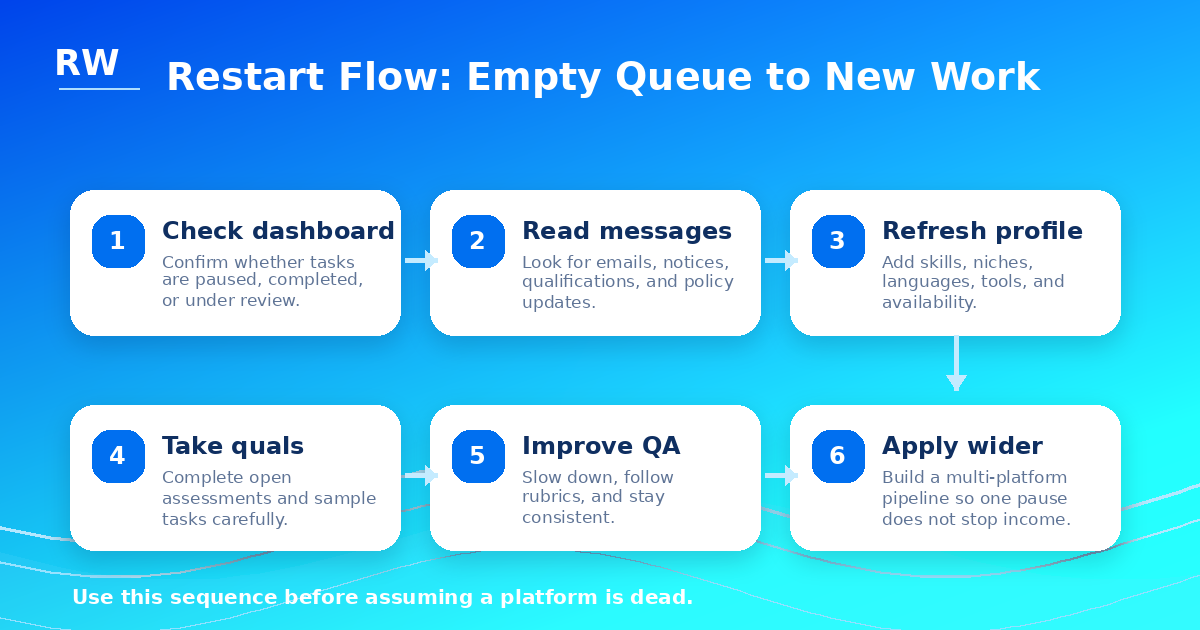
Before you update your profile or apply elsewhere, take 20 minutes to audit the account. Write down what you see. Check whether the dashboard says no tasks, no projects, account under review, qualification required, or something else. Check whether your previous work history still appears. Check whether your payment settings are still normal. Check whether your email has platform messages from the last two weeks. Check whether any assessments are open but incomplete.
Treat the first step like diagnosis, not emotion. The right response to a supply problem is different from the right response to a quality problem, and those two are different from the right response to a missed qualification. Do not apply the same fix to all three situations.
Step 2: Refresh Your Profile for Matching
If your profile is generic, you are harder to match. A weak profile says you are interested in remote AI work and can do writing, research, and data entry. A stronger profile tells the platform exactly where your judgment is best and gives the matching system something specific to work with.
A stronger profile says: "I have experience reviewing written content, checking factual claims, comparing AI responses, writing clear explanations, and evaluating whether answers follow instructions. I am strongest in business, marketing, remote work, finance, career content, social media, and general research. I am available for AI evaluator, AI training, data annotation, prompt review, and content quality projects."
Use the same idea for your resume. Add a short AI work section even if you are new: AI response evaluation, factuality checking, prompt and instruction review, content quality scoring, search and research evaluation, data annotation and labeling, written feedback and rubric-based review, domain expertise in your strongest categories. These specific terms are what matching algorithms and human reviewers scan for when assigning new projects.
Step 3: Complete Every Open Qualification Carefully
When tasks stop, many workers rush into every qualification available. That can backfire. Qualifications are the gate into higher-quality work. Treat them like paid work even if they are unpaid or short.
Read the instructions twice. Look at examples. Notice edge cases. Slow down. A good AI evaluation answer usually explains the decision in plain language: which response followed the user request better, which answer was more accurate, which answer was safer or more complete, which answer ignored an instruction, which answer used unsupported claims, which answer was clearer for the user.
If you are applying to platforms like micro1, Mercor, Handshake AI, Outlier, or similar remote AI work sites, precision beats speed at the qualification stage. A qualification failure often closes access to that project category for weeks or indefinitely. One careful pass is worth more than three rushed failures.
Step 4: Improve Your Quality Signals
AI training tasks reward consistency. Build a simple mental checklist for every task you complete: What is the user asking for? What does the instruction say to prioritize? Does the answer contain unsupported claims? Does the answer fully satisfy the prompt? Are there safety, formatting, or tone issues? Am I applying the same standard I used on the last ten similar tasks?
This is also how you move from beginner AI annotation work into better AI evaluator jobs. The people who get more work are usually not just faster. They are more reliable. Platforms track quality metrics across your submissions. A strong track record in one project category often results in priority access when a new related project opens.
Consistency tip: If you do annotation or evaluation work in batches, take a short break between sessions to reset your mental baseline. Fatigue causes drift in how you apply the rubric, and that drift is what quality review catches.
Step 5: Broaden Your Task Categories
If you only qualify for one type of AI training task, you are exposed to one kind of slowdown. A better strategy is to build a wider profile without overclaiming expertise.
Remote AI work includes writing evaluation, AI data annotation, search evaluation, conversation rating, prompt testing, code review, math reasoning, legal review, finance review, medical content review, translation, localization, education support, customer support evaluation, image annotation, audio transcription review, and research-heavy fact-checking. Each of these is a separate qualifying track on most platforms.
The question is not only what tasks are available. The better question is what can you credibly evaluate better than a random applicant. If your background is in business operations, that is a realistic claim for business-domain AI evaluation. If you have strong English writing skills, that is a realistic claim for writing quality and factuality review. Qualify for the categories where you can honestly do better work, and leave the rest alone.
Step 6: Stop Depending on One Platform
The biggest mistake in AI training work is treating one platform like a permanent employer. Even strong workers can experience pauses. Build a pipeline across several remote AI work platforms including micro1, Mercor, Handshake AI, Outlier, and other legitimate AI training or AI evaluation sites.
Track applications in a simple spreadsheet: platform, profile completed, resume uploaded, qualification completed, interview completed, current status, last follow-up date, task category, pay rate or expected pay, notes. When one platform goes quiet, the others may have active work. When a platform reopens a project, you want to already be in the system, not starting from scratch.
General AI training tasks typically pay $20+/hr. Expert-tier roles in legal, finance, medical, coding, or research categories can pay $50–$200/hr. Building a multi-platform pipeline means you have a better shot at accessing higher-value work when it appears, because you are already qualified and active across more systems.
Don't wait on an empty queue. Find new AI work opportunities on RemoteWorkUnion.com.
Find Roles Hiring Now →Step 7: Use a Weekly Restart Routine
The workers who maintain the most consistent remote AI income are not the ones who grind hardest during active stretches. They are the ones who keep their pipeline healthy during slow periods.
Build a weekly routine that takes 30 minutes or less. Once per week: check every AI training dashboard, complete new qualifications if available, update your profile with any new skills or recent work examples, apply to at least two new remote AI roles or platforms, follow up on stalled applications with one brief professional message if it has been more than two weeks, and review your work habits from the last task batch to spot any patterns worth changing.
This turns remote AI work from a lottery into a system. The system will not produce results every week, but it will produce better results over three months than waiting on a single dashboard to reactivate.
What Not to Do When Tasks Stop
When your task queue goes quiet, certain reactions make the situation worse rather than better. Here is what to avoid.
Do not create duplicate accounts. Most platforms have identity verification and can detect duplicate registrations. Creating a second account to work around a slow queue or a quality review is a terms of service violation that can result in permanent removal.
Do not use a VPN to pretend you are in another country. Geographic eligibility rules exist for legal, tax, and compliance reasons. Circumventing them puts your account at serious risk and may disqualify your earnings.
Do not submit false credentials. If a project requires a law degree, medical license, or engineering certification, those claims will be verified. False credentials result in immediate removal.
Do not use AI tools to complete AI evaluation tasks when the platform prohibits it. The irony is significant but real: using an AI model to complete tasks designed to measure human judgment is a policy violation on most platforms. If caught, it is usually a permanent ban rather than a warning.
Do not rush every open qualification just because you want work fast. Failed qualifications are recorded. Taking them carelessly when you are anxious about income is exactly the wrong approach. Wait until you can give them focused attention.
Do not assume silence means permanent rejection. AI training platforms are not great communicators. Weeks of silence often mean that no matching project is active, not that you have been removed. Check your account status carefully before drawing that conclusion.
A Seven-Day Restart Plan
If your task queue has been empty for more than a week and you are not sure what is causing it, use this sequence.
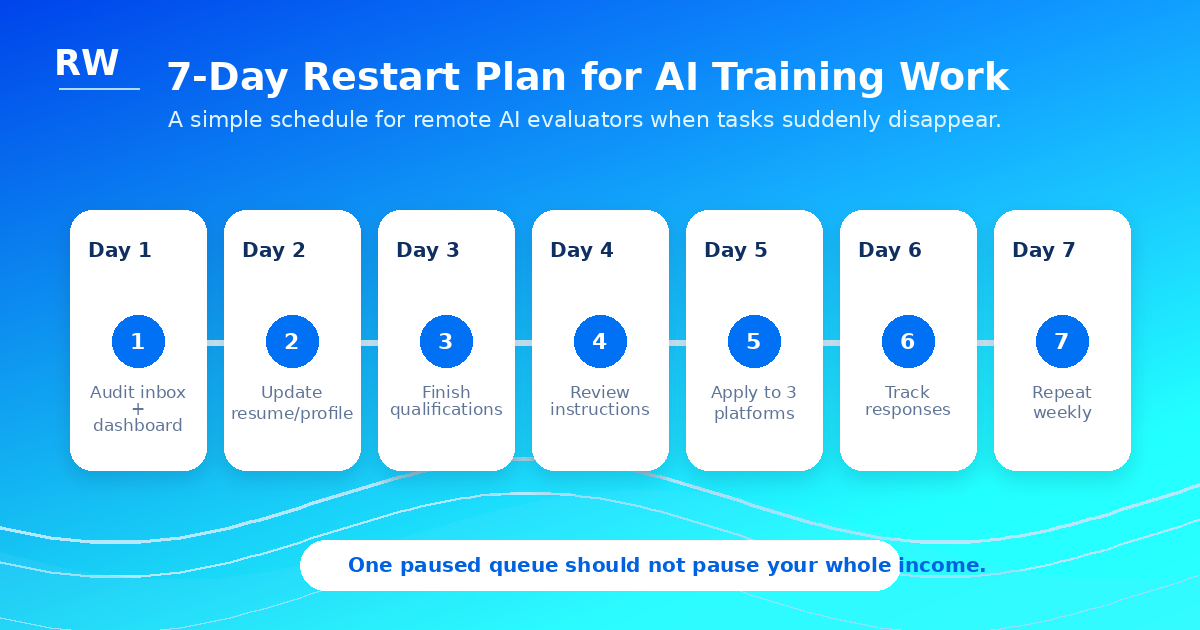
Day 1: Audit your account status and email for any platform notices. Write down what you see. Identify whether the issue is supply, quality, matching, or a missed qualification.
Day 2: Update your profile with better skill keywords and more specific category selections. Remove vague claims. Add specific domain examples. Make your strongest skill the first thing a reviewer sees.
Day 3: Refresh your resume to include AI training and evaluation language. Even if you have done only a small amount of this work, document it: AI response evaluation, factuality checking, rubric-based scoring, data annotation, quality review.
Day 4: Check and complete any open qualifications carefully and slowly. Read every instruction before you begin. Take notes on the examples the platform provides.
Day 5: Send one professional support message if you have a specific account question that could not be answered by checking your dashboard and email. Keep it brief and specific.
Day 6: Apply to two or more new remote AI platforms or role types. Use the same updated profile and resume you created on Days 2 and 3.
Day 7: Set up a weekly routine tracker so a slow period does not catch you off guard again. A simple spreadsheet with platform names, qualification status, last check-in date, and current task status takes 20 minutes to build and saves hours of anxiety later.
Frequently Asked Questions
What is the most common reason AI training tasks stop?
Project completion is the most common reason. A dataset batch closes, a client pauses, and the queue empties. This is normal and not usually a sign of personal failure.
How long does it usually take for tasks to come back?
It varies. Some workers see new tasks within a few days after a project reopens or a new one starts. Others wait several weeks. This is why maintaining multiple platform applications is important.
Should I keep my account active even when there are no tasks?
Yes. Stay available, complete any new qualifications, respond to platform messages, and update your profile. An idle account that is still in good standing is better than one that seems abandoned.
Can completing more qualifications help bring tasks back?
Often yes. New qualifications unlock new task categories. If you have been in one category that slowed down, adding a related category through a qualification test can open new work.
Is it possible to lose an AI training account permanently?
Yes, but it usually requires a policy violation, sustained low quality, duplicate account creation, false identity, or payment fraud — not just a slow period. A quiet queue is almost never a permanent removal. Check your account status and email carefully before assuming the worst.